
OWN DEMO PROJECT · MEDICAL CLINIC WEBSITE, SEO & SPEED
I designed and built Northgate Family Clinic, a demo website for a multi-specialty medical and dental clinic in Raleigh, NC, using only free tools. It has 15 pages, including 5 department pages, a 10-doctor directory with search and filters, an online booking form, a mega menu, a fixed quick-action bar and a virtual assistant chat. I completed on-page SEO and schema, then measured speed with Google PageSpeed Insights.
Website: clinic.mitaur.com (fictional clinic, not a real practice)
Date: November 2026 · 15 pages, 10 doctors
Tools: WordPress, Blocksy, Rank Math, Contact Form 7, LiteSpeed Cache and Google PageSpeed Insights.
THE RESULT
PAGESPEED · DESKTOP · HOME
Largest Contentful Paint 0.8 s, zero blocking time and almost no layout shift.
PAGESPEED · MOBILE · HOME
First Contentful Paint 1.1 s and zero layout shift, with a large hero photo and a serif heading font.
ACCESSIBILITY · HOME
Fixed a low-contrast button and the footer heading order after the first test.
| Device | Performance | Accessibility | LCP |
|---|---|---|---|
| Desktop | 99 | 100 | 0.8 s |
| Mobile · first test | 95 | 95 | 2.6 s |
| Mobile · after fixes | 93 | 100 | 3.1 s |
Also: Best Practices 100 and layout shift 0 on mobile. Lab scores move a few points between runs.
Mobile performance stayed in the 93 to 95 range across runs; the main limit is render-blocking theme CSS on a slow mobile connection. PageSpeed’s SEO score shows 66 only because the demo site is intentionally set to noindex.
EVIDENCE
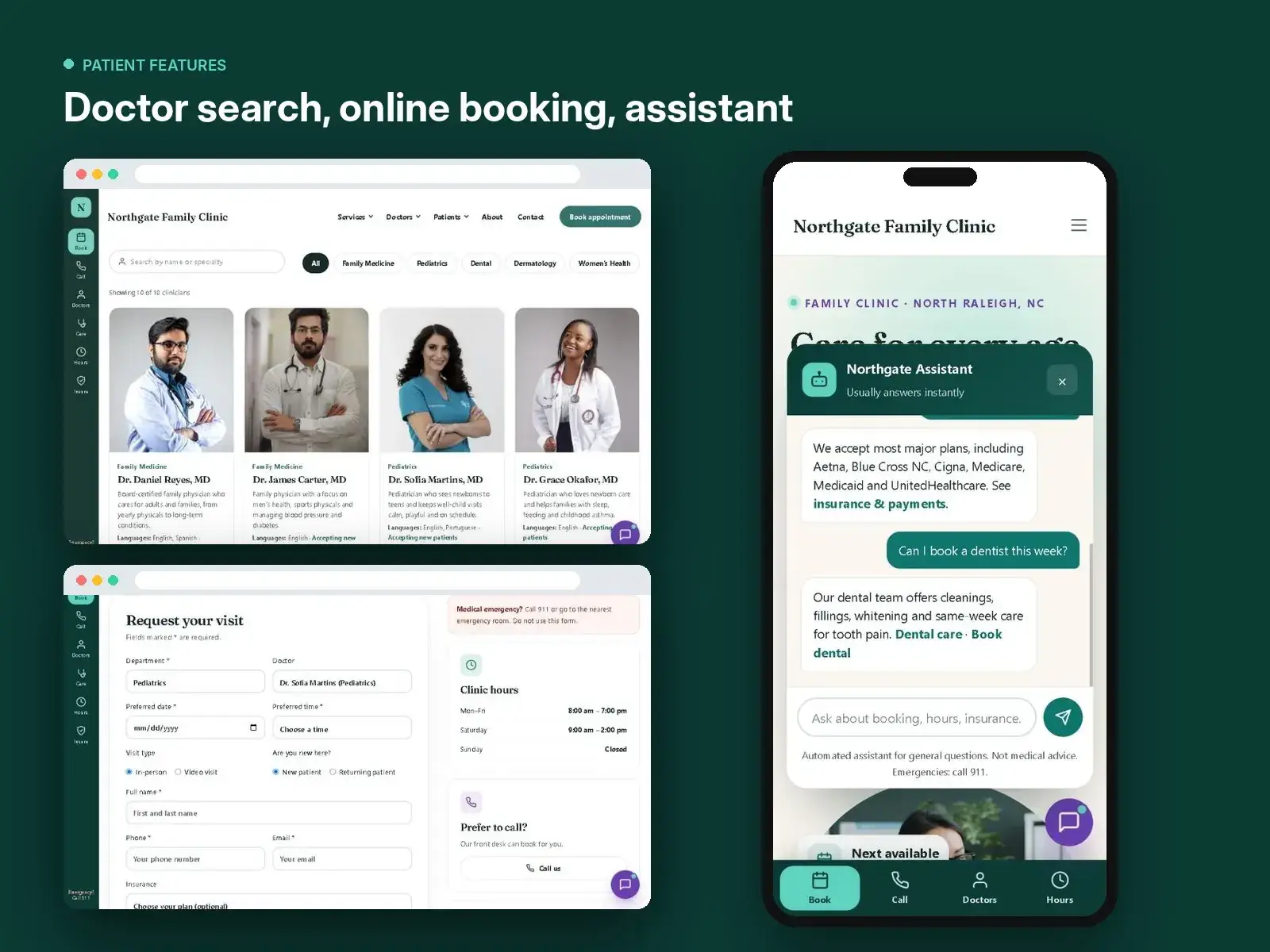
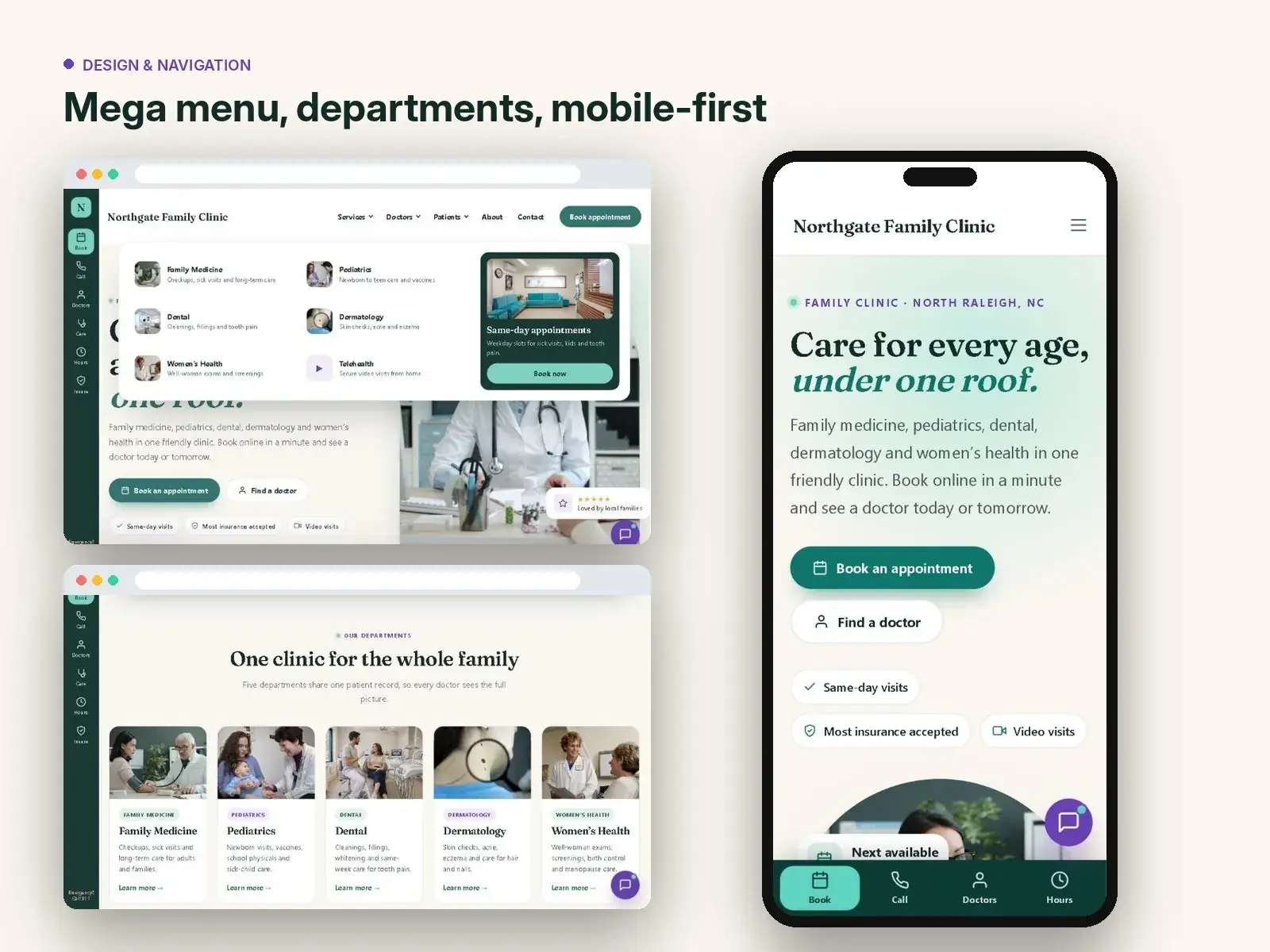
The first image shows the speed and SEO results. The second shows the patient features: doctor search, booking form and the virtual assistant. The third shows the mega menu, departments and mobile design.
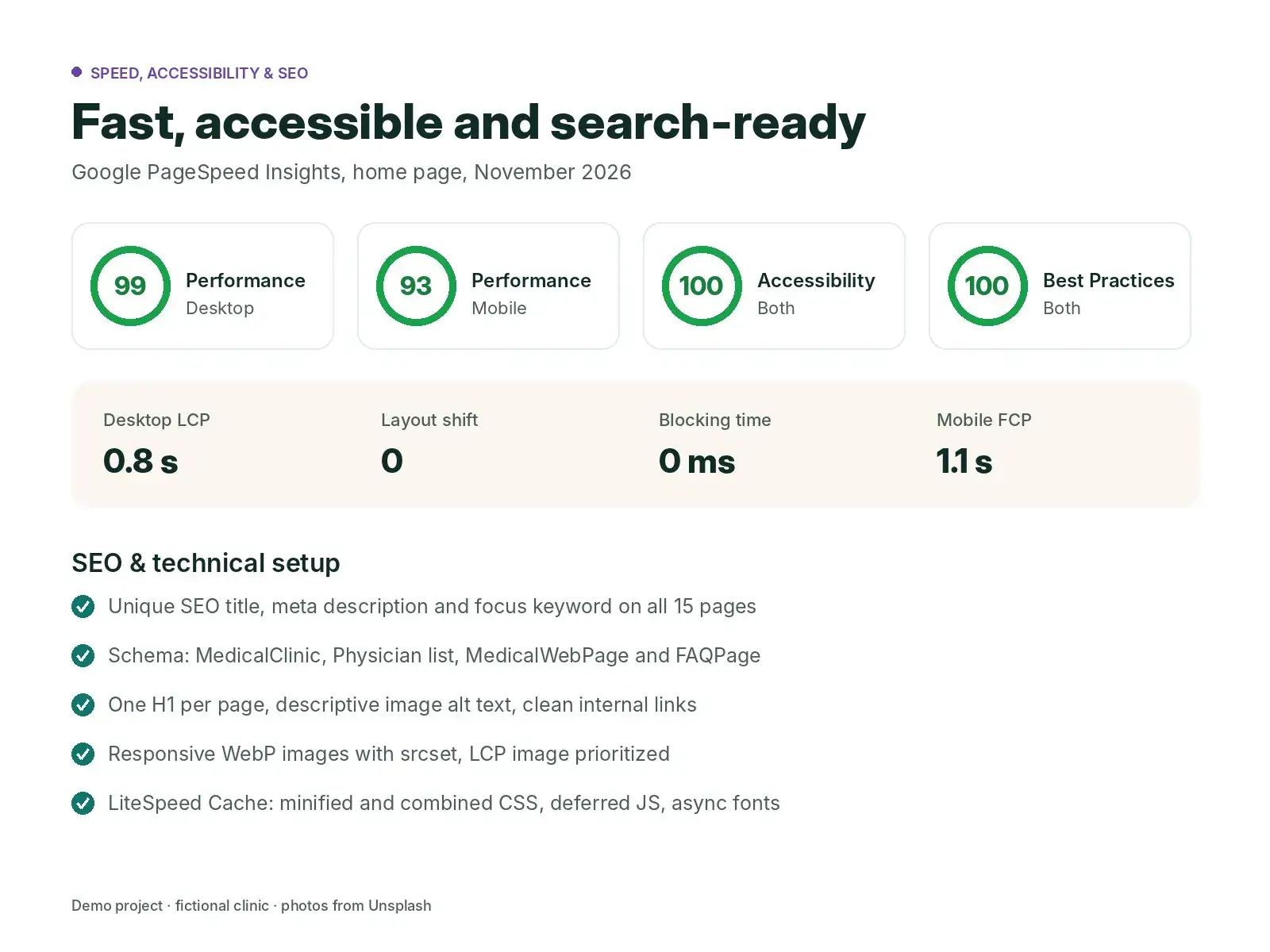
Speed — November 2026: desktop 99, mobile 93 to 95, accessibility 100, Best Practices 100, layout shift 0.
SEO: unique title and meta description on all 15 pages, one H1 per page, and MedicalClinic, Physician list, MedicalWebPage and FAQPage schema.
THE BRIEF
I wanted a realistic healthcare project to show clients: a clinic with several departments, many doctors and a clear booking path, built only with free tools. It needed to feel calm and trustworthy, work well on phones and avoid collecting sensitive health details online.
STEP BY STEP
I planned 15 pages: home, a services hub with 5 department pages (family medicine, pediatrics, dental, dermatology and women’s health), a doctor directory, booking, patient information with insurance and self-pay prices, About, FAQ, Contact, Privacy and Terms.
I chose a deep teal, cream and plum palette with a serif heading font, rounded cards and a fixed left quick-action bar for Book, Call, Doctors and Hours. On phones the bar moves to the bottom of the screen. I added a mega menu that shows departments and doctors with photos.
The directory lists 10 clinicians with search by name and filters by department. The booking form only shows doctors from the chosen department, blocks past dates and can be pre-filled from a doctor card. A lightweight virtual assistant answers questions about booking, hours, insurance and prices, and sends emergencies to 911.
With Rank Math I wrote a unique title, meta description and focus keyword for every page. I added custom JSON-LD: MedicalClinic on the home page, MedicalWebPage and FAQPage on department pages, a Physician list on the doctors page and FAQPage on the FAQ page.
I served WebP images with responsive srcset, gave the hero image high fetch priority, and set LiteSpeed Cache to minify and combine CSS, defer JS and load Google Fonts asynchronously. The first test found a low-contrast button and a skipped heading level, which I fixed.
Desktop scored 99 with an LCP of 0.8 s. Mobile scored 93 to 95. Accessibility reached 100 and layout shift stayed at 0.
THE REMAINING WORK
REPORT CONTEXT
Test date: November 2026. Tool: Google PageSpeed Insights (Lighthouse lab data), mobile and desktop, home page.
These are lab performance scores and on-page checks, not rankings, bookings or traffic, and no ranking result is claimed. All names, doctors, prices and reviews on the demo site are fictional.
YOUR CLINIC · A CLEAR NEXT STEP
Share your services, doctors and how patients book today. I will reply with a clear plan, timeline and price.
Questions about this case study? Join the discussion below. Comments are reviewed before publication.